

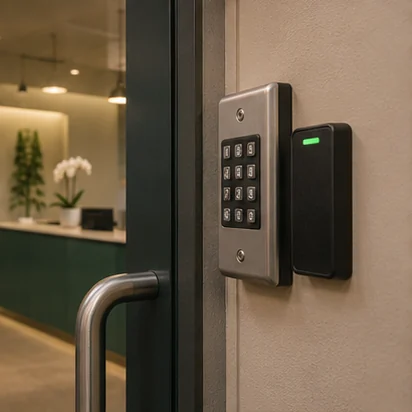
Decide how people should enter and leave
A single side office may need a keypad for a small group. A building entrance may need credentials that can be issued and revoked for many people. A service door may need time-based access for approved vendors. Write down who uses each opening, whether schedules matter and who will manage credentials. If you are moving out of a shared key system, ask which keys should still work and who should have them. An opening at the end of a corridor has a different job from a public entrance at the front of a busy building.
The way people leave matters for every design. Identify what the opening is used for and whether it serves required egress or has rated hardware. The existing route, the building's requirements and the behavior during a power interruption all belong in the discussion with the responsible building team. If you are a tenant, confirm who can change the frame, run wiring or alter a door that serves multiple spaces. Get the people responsible for the door and the controls into the same conversation early.
Follow the symptom from reader to door
When a credential shows a normal response but the door remains shut, tell us what you saw and heard. Does a light change or a sound occur? Is there movement at the frame? Does the door open normally when released by the authorized method used by staff? Has the latch been rubbing or requiring extra pressure? A key, the reader, the system that makes the access decision and the hardware that releases the opening can each present a different symptom.
If the problem affects one credential, let your administrator check whether the user was issued the right access. If every credential fails at the same opening, note when it started and whether the door's mechanical behavior changed. If multiple openings are affected, report that before arranging a visit. Keep codes, credentials and account access private. We can work from a description of the behavior, visible hardware labels and an authorized contact rather than asking you to share live credentials.
Describe a change without sharing credentials
Explain the result you want in plain terms. You might need staff access after the reception desk closes, entry for two approved contractors or a way to take a former employee off an existing list. Those requirements let a building administrator discuss access rules without passing around codes or account details. Keep the exact contact for the administrator or service provider close at hand, and note which group or time window the request involves. If a reader and a mechanical cylinder both belong to the same opening, include both in the handoff.
A change on one opening can affect people beyond the person requesting it. Identify the normal visitor route, the people who have regular access and what staff do if they arrive outside normal hours. In a multi-tenant Atlanta building, the owner may also have rules for how locks and credentials are managed. Ask about entry, exit and ongoing maintenance as part of the same visit. For a fault, share whether another authorized user says the same thing happened and whether there was recent work to the door or the system.
Keep a copy of the final opening list and authorized contacts after the work. The next person who reports a fault should be able to identify the door without guessing which system manages it.
Equipment comparisons
Compare the function of the component
Use these models as reference points. Ask about fit, availability and the work your opening needs before choosing a part.
HID Signo 20
A compact reader family for credential-based systems. Ask the system administrator which credential technologies and connections the existing platform can use.
Manufacturer detailsHES 5000 Series
A low-profile electric strike reference for certain cylindrical lock openings. Verify the frame, latch and system requirements with the installer.
Manufacturer detailsSchlage CO-100
A standalone keypad lock for a single opening. Compare how you would add or remove users at the door and whether you need centrally managed credentials.
Manufacturer detailsA standalone opening or part of a larger system
A standalone keypad lock may suit an opening where one person can manage the users at the door and there is no need to connect it to other openings. A managed credential system can make sense where people move between doors, staffing changes frequently or there is an established access platform to maintain. Think about how the office adds a user today, how quickly it needs to remove access and whether someone is available to administer the system.
For a suite reached from a building-controlled lobby, coordinate with the property team before selecting equipment. A reader's appearance does not tell you which credential formats or control panels it works with. A strike has to fit both the physical frame and the latch it will release. Hardware, power, wiring, credentials and permissions need to work together. Ask who will maintain the opening after installation, where the relevant records will live and which provider handles problems that arise outside the scope of the door hardware.
Write a short acceptance list
Start with normal entry. A credential or code authorized for that opening should work reliably. Then verify the opening returns to a secure position and the door can be used to exit as intended. Have the appropriate administrator test the removal of a sample credential and any schedule that matters for the job. Any checks involving building alarm ties, loss of power or other building functions should be arranged with authorized personnel so the test does not disrupt the facility or interfere with exit.
Agree on who keeps documentation for the opening, who receives credentials and how changes get approved. For a multi-tenant property, the person who manages a suite and the person who manages the shared entry may have separate roles. A simple handoff with the opening identifier, approved settings and the correct point of contact can make the next change easier. Confirm where staff should report a credential fault and where they should report a door that no longer closes correctly.
Begin with a door list and a contact
Make a short list if you are looking at more than one opening. Include the physical entrance, current hardware, the group it serves, and the one change you want most. Share any photos from a public or authorized position and keep sensitive details out of the image. If the existing provider needs to take part, have their contact ready. Knowing the Atlanta address is only part of finding the job. The lobby, suite, service entrance or shared door identifier tells us where the actual work belongs.
A good first call may end with a site review rather than with a decision about which reader to buy. Tell us whether day-to-day operation, a failure or a change in access policy prompted the call. We can use that to discuss the opening and the scope you have permission to change. Start with the door that carries the most traffic or is interfering with work, and build the rest of the list around it.
Questions about access control
Can I keep the cards we use today?
That depends on the reader, credentials and access platform. Ask the system administrator for the supported format or model information.
Should a door that sticks be fixed before a reader is added?
The closer, latch and alignment should be reviewed as part of the same plan. Reliable entry still depends on the door moving and latching properly.